PDF to study notes: a practical visual-note workflow
Turn a PDF or research paper into visual notes or editable study pages with Papyr. Follow a worked study workflow, check sources and choose supported exports.
By Papyr · Updated September 16, 2026Choose a question before making notes
Start with the question the document should help you answer. For a paper on attention, it might be ‘How does each token choose which other tokens matter?’ Read the abstract and relevant sections before deciding whether you need the whole document.
Preserve the source beside the explanation
Keep the document title, relevant section and original terminology with the note. Separate what the author reports from your interpretation. For an equation, record what each symbol means and the conditions under which it applies. A short note without context can be harder to trust than the original paragraph.
Choose a structure that fits the idea
Use a flow diagram for a process, a comparison table for trade-offs, and an annotated example for a calculation. Avoid decorating every paragraph. For attention, trace a single query through the score, weighting and output steps, then explain why changing the input changes the result.
Check the note against the document
Read the generated note beside its source. Check numbers, qualifications, diagrams and attribution. If a detail is unsupported, remove it or label it as a question. Papyr can turn supported inputs into editable study pages and visual notes; generation does not replace this source check.
End with something to retrieve
Close the document and explain the central idea in a few sentences. Add one application question and one question about limitations. Save the note to a collection with a name you would search for later. On your next visit, answer the questions before rereading.
Try it with a real teaching source
Attention Is All You Need — original paper on arXiv ↗
Use this paper as a practice source. Import the arXiv link or its PDF in Manual Notes, then focus your first note on scaled dot-product attention rather than the entire paper.
- Keep the paper title and the attention section with your imported material. Decide which question your first page should answer.
- Create a visual or editable note that traces queries, keys and values through the calculation. Retain the meaning of the symbols.
- Compare the note with the paper’s equation and explanation. Save it to your library; choose a supported PDF or image export when available.
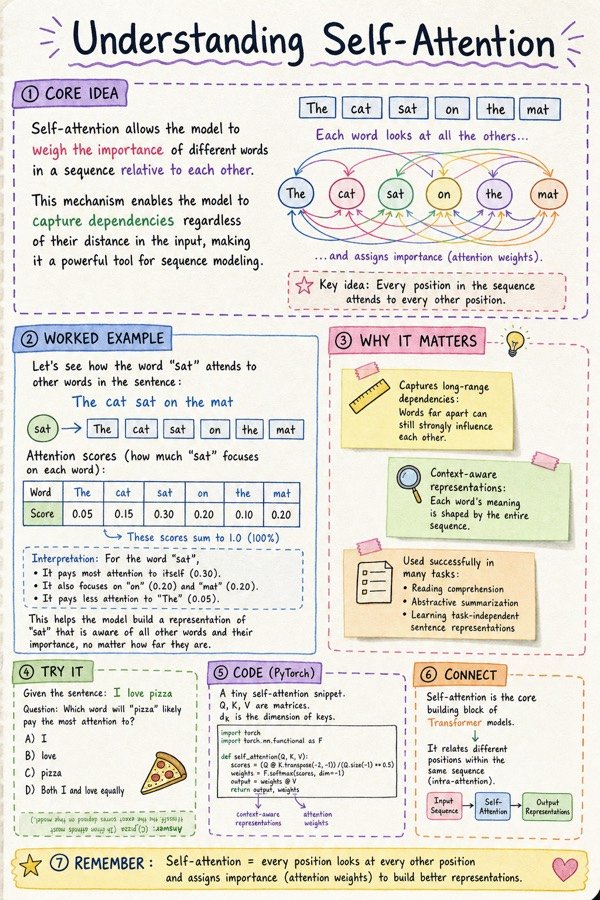
Download the sample image (JPG)
Import or analysis and note generation are separate steps. Review costs before generating; PDF/PNG export options depend on your note type and plan. See pricing and limits.
Turn a PDF into notesPut it into practice
Turn a PDF into notes or see Papyr’s visual notes.